
The on balance function is activated in the step view by adding a condition.
After clicking [Update], the configuration of the condition appears directly below.
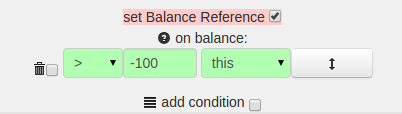
The balance is the difference between the current balance and the balance reference:
Balance = current balance − balance reference
If the balance reference is never reset, the following applies:
Balance = current balance (- 0)
If set is enabled, the balance reference is assigned the value of the current balance after the evaluation of the respective step.
If set is not activated in any step, the balance reference always remains 0.
If a configured condition is met, on balance takes priority over on win / on loss and on field win.
If multiple conditions exist in one step, the topmost fulfilled condition is applied.
Priority: top to bottom — topmost first.
Example: strategy on balance
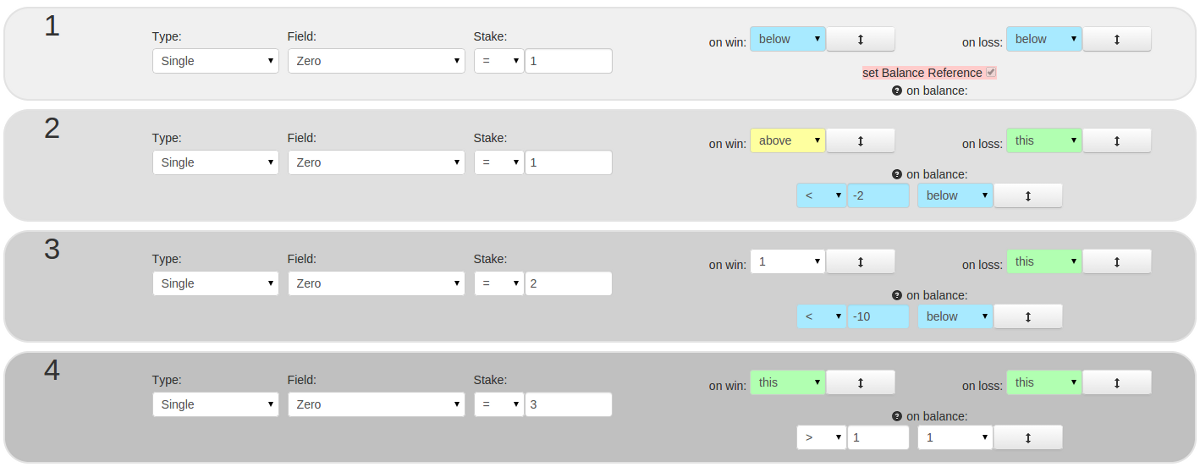 on balance
1st step:
Bet 1 piece on Zero.
On win and on loss of this bet, jump to step 2. (here, in every case)
The "on balance" function is not activated.
The balance reference is set. After the evaluation of this step, the value of the current balance is saved as the balance reference.
2nd step:
Bet 1 piece on Zero.
On win jump to step 1.
On loss repeat step 2.
The "on balance" function is activated:
After the evaluation of the step, the condition "balance < -2" is checked:
Assuming the first step was lost, the balance reference would be -1.
If the second step was also lost, the balance would then be -2.
The condition "current balance < balance reference -2" would be: -2 < -1 -2 means: -2 < -3.
In this case the condition is not met, the jump of "on loss" would be made.
If the condition is met, the jump to step 3 is made.
The jumps of "on win" and "on loss" are subordinated in that case.
3rd step:
Bet 2 pieces on Zero.
On win jump to step 1.
On loss repeat step 3.
The "on balance" function is activated:
After the evaluation of the step, the condition "balance < -10" is checked.
If the condition is met, the jump to step 4 is made — prior to "on win" / "on loss".
4th step:
Bet 3 pieces on Zero.
On win and on loss repeat step 4.
The "on balance" function is activated:
After the evaluation of the step, the condition "balance > 1" is checked.
If the condition is met, the jump to step 1 is made — prior to "on win" / "on loss".
The functionality is visible in the public tests of this strategy.